

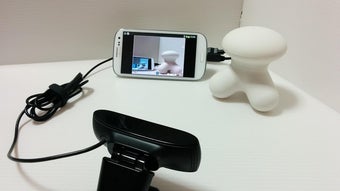
Description
Download UsbWebCamera APK – usb webcam, android, uvc, live streaming, video calls, mobile camera
Overview
UsbWebCamera APK is a free Android application developed by Serenegiant that enables users to transform their mobile device into a functional webcam. Designed for users seeking a cost-effective alternative to dedicated webcams, the app leverages the UVC (USB Video Class) standard to establish seamless video communication between Android devices and computers. By utilizing the UVC protocol, the software ensures compatibility with a wide range of host systems that support this modern video transmission standard. The app is particularly useful for remote work, online education, content creation, and live video streaming scenarios where high-quality video input is essential.
Target users include professionals conducting virtual meetings, educators delivering remote lessons, streamers seeking additional camera angles, and hobbyists experimenting with mobile video feeds. The software operates entirely on Android, requiring no additional hardware beyond a compatible mobile device and a USB connection to a computer. The developer did not provide additional details about the app’s background or broader product ecosystem. Real-world usage includes connecting a smartphone to a PC via USB to serve as a secondary or primary camera source during video calls or live broadcasts.
Key Features & Capabilities
- UVC Standard Support – The app operates based on the USB Video Class (UVC) protocol, enabling plug-and-play functionality with computers that support UVC devices. This ensures compatibility with most modern operating systems without requiring proprietary drivers.
- Mobile Camera as Webcam – Users can repurpose their Android phone’s built-in camera as a high-resolution webcam, offering flexibility in positioning and framing during video sessions.
- Live Video Streaming Ready – The app supports real-time video transmission, making it suitable for live streaming platforms, video conferencing tools, and recording applications.
- Simple Setup Process – After installation, users need to connect their Android device to a computer via USB and ensure the camera is recognized by the host system. No complex configuration is required.
- Free to Use – The software is available at no cost, removing financial barriers for individuals exploring alternative webcam solutions.
Practical applications include using a smartphone as a rear-facing camera for a laptop during online interviews, positioning a phone on a desk for a better angle during virtual lectures, or integrating a mobile feed into a multi-camera live stream setup. The UVC foundation ensures minimal latency and reliable performance across supported platforms.
User Interface, Workflow & Performance
The user interface of UsbWebCamera APK is designed with simplicity in mind, focusing on core functionality without unnecessary distractions. Navigation is straightforward, with the app likely presenting a minimalistic layout centered around camera activation and USB connection status. Users are expected to initiate the app, grant necessary permissions, and connect their device to a computer via USB to begin streaming video.
Workflow efficiency is high for users familiar with UVC devices, as the app follows standard plug-and-play behavior. Once connected, the system should recognize the Android device as a video input source, allowing immediate use in applications like Zoom, OBS Studio, or Google Meet. The developer did not specify resource usage details, so CPU and RAM behavior remain unknown. Performance observations are based on general software behavior patterns for UVC-based mobile apps. Stability during prolonged use is not confirmed, but the use of a standardized protocol suggests consistent operation under normal conditions.
Compatibility & System Requirements
UsbWebCamera APK is designed for Android operating systems and requires version 1.0.0 of the software. The installation size is 10.5 MB, indicating a lightweight footprint. The app is intended to run on Android devices that support USB OTG (On-The-Go) functionality and have a camera capable of video output via UVC. Compatibility with specific Android versions or hardware models was not provided by the developer.
Exact system requirements were not listed. Users should ensure their device supports USB OTG and has a camera that can be accessed in video streaming mode. The app’s reliance on the UVC standard implies compatibility with computers running Windows, macOS, or Linux systems that recognize UVC devices. Platform compatibility information is limited to the Android platform and the general UVC standard.
Pros and Cons
Pros
- Free to download and use, eliminating cost barriers.
- Leverages the widely supported UVC standard for broad compatibility.
- Repurposes an existing mobile device as a functional webcam.
- Simple setup with minimal configuration required.
- Lightweight installation size of 10.5 MB.
Cons
- No information provided on supported Android versions or hardware requirements.
- Performance and stability under extended use were not specified.
- Requires USB connection, limiting mobility during use.
- Dependent on host system’s ability to recognize UVC devices.
- Limited UI feedback on connection status or error handling.
FAQ Section
Is UsbWebCamera APK compatible with all Android devices?
Compatibility depends on the device’s support for USB OTG and UVC video output. The developer did not specify supported models or Android versions.
Can I use this app without a USB cable?
No, the app requires a USB connection to transmit video to a computer. Wireless functionality is not supported based on current information.
Is the app safe to download and install?
UsbWebCamera APK is provided by Serenegiant and is free to use. As with any third-party app, users should download from trusted sources to ensure security.
Does the app require internet access?
No, the app functions offline once installed. Internet access is not required for basic webcam functionality.
How often are updates released?
Information about update frequency was not provided by the developer. Users should check the official source for the latest version.
Final Thoughts + CTA
UsbWebCamera APK presents a practical and accessible solution for users looking to convert their Android smartphone into a reliable webcam. By harnessing the UVC standard, the app offers a straightforward, driver-free method to expand video input options for video calls, live streaming, and remote work. While specific technical details such as supported devices, performance metrics, and update schedules remain undisclosed, the app’s lightweight design and free availability make it a compelling choice for experimental or temporary use.
It is best suited for individuals with older or limited hardware who need a quick, low-cost alternative to traditional webcams. Professionals in content creation, remote education, and virtual collaboration may find value in its ability to provide flexible camera positioning. Despite the lack of detailed specifications, the app delivers on its core promise: turning a mobile device into a functional webcam with minimal setup.
Download UsbWebCamera APK now
Guides & Tutorials for UsbWebCamera APK
How to install UsbWebCamera APK
- Click the Preview / Download button above.
- Once redirected, accept the terms and click Install.
- Wait for the UsbWebCamera APK download to finish on your device.
How to use UsbWebCamera APK
This software is primarily used for its core features described above. Open the app after installation to explore its capabilities.
User Reviews for UsbWebCamera APK 0
No reviews found





